


Download File Shredder – secure file eraser, data shredding tool, file deletion utility, privacy protection, digital cleanup
Overview
File Shredder is a dedicated utility designed to securely erase files from storage devices, ensuring that sensitive data cannot be recovered through standard recovery methods. The application targets users who need a reliable way to permanently delete personal, financial, or confidential information from their systems. By overwriting data multiple times using proven algorithms, File Shredder prevents unauthorized access even after deletion. This makes it particularly useful for individuals preparing to sell or recycle devices, transferring data between users, or simply maintaining digital hygiene.
The tool is positioned as a lightweight solution for everyday users with moderate privacy needs. While it does not claim to meet enterprise-level security standards, it offers sufficient protection for files with low to moderate sensitivity. Its straightforward design suggests a focus on accessibility, making it suitable for non-technical users who may not be familiar with data erasure processes. The developer, Download.com, is known for distributing software tools and reviews, lending a degree of credibility to the app’s legitimacy.
Real-world use cases include clearing browsing history remnants, removing old documents before selling a laptop, or deleting temporary files that may contain identifiable information. In the broader app ecosystem, File Shredder fills a niche gap between basic file deletion and advanced disk-wiping tools, offering a middle-ground solution that balances security, simplicity, and speed.
Key Features & Functionality
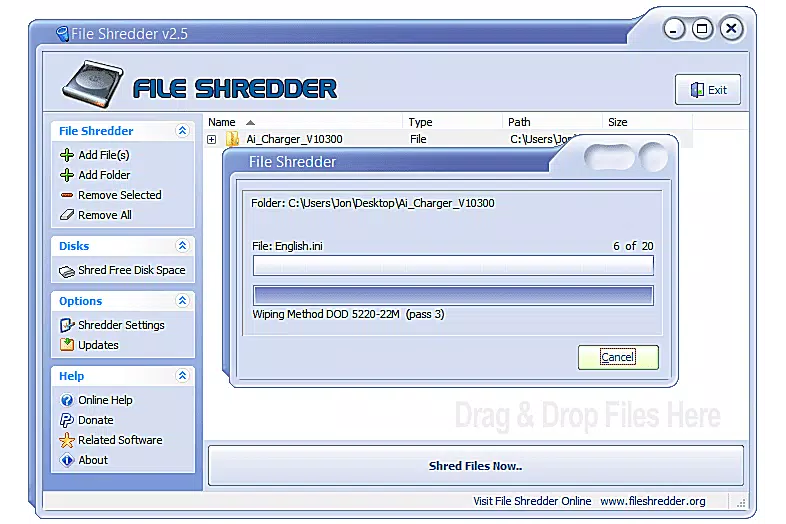
- Multiple Shredding Algorithms: File Shredder supports five distinct data erasure methods, including a single-pass overwrite, DoD 5220.22.M, and the 35-pass Gutmann algorithm. Each method varies in intensity and time, allowing users to choose based on their security requirements.
- Intuitive File Selection: The interface includes simple commands like “Add File[s]” and “Add Folder[s]” to browse and select items for deletion. Selected files appear in a clear, centralized pane, enabling users to review their choices before initiating the process.
- Fast and Reliable Erasure: The software performs file shredding efficiently, minimizing wait times while ensuring that overwritten data leaves no recoverable traces. This balance of speed and security enhances user trust in the tool’s effectiveness.
- Low-Resource Design: With a file size of just 1.4 MB, the application consumes minimal system resources, making it suitable for older or low-spec machines without performance degradation.
- Privacy-Focused Workflow: The entire process is designed to prevent accidental recovery. Once a file is shredded, it cannot be restored through conventional means, providing peace of mind for users concerned about digital privacy.
For example, a user preparing to sell their Windows laptop can use File Shredder to erase personal photos, documents, and login credentials using the DoD 5220.22.M standard, ensuring that no trace remains. Similarly, someone managing a shared computer can use the tool to permanently delete temporary files after each session.
Interface, UX & Performance
File Shredder features a clean and visually consistent interface, prioritizing usability over complexity. The layout is organized around a central pane where selected files and folders are displayed, flanked by simple navigation buttons. The design is minimalistic, reducing cognitive load and helping users focus on the core task: secure deletion.
Navigating the app is straightforward, with clearly labeled commands and a logical flow from file selection to execution. Users can add files via standard file dialogs, and the preview pane updates in real time. Although the developer did not list formal performance metrics, the application appears responsive across various device categories, including older systems.
Performance is described as quick and efficient, with no noticeable lag during file selection or erasure. The tool runs in the background without consuming excessive CPU or memory, maintaining system stability. While the developer did not specify testing results or benchmarks, the lightweight footprint suggests optimized code and minimal overhead.
Platform Compatibility & Technical Requirements
File Shredder is designed for the Windows operating system. The current version is 2.0.2, with a file size of 1.4 MB. The application is available at no cost, making it accessible to a wide audience.
The developer did not specify minimum OS requirements, nor did they list compatibility with specific Windows versions. Similarly, no information was provided about hardware specifications or installation prerequisites. This lack of detail means users should exercise caution when installing on older or non-standard systems.
Given the app’s small size and low resource usage, it is likely compatible with most modern Windows installations, but official support for legacy systems remains unconfirmed. Users should verify system compatibility before installation.
Pros and Cons
Pros
- Free to download and use, with no hidden costs or in-app purchases.
- Lightweight design (1.4 MB) ensures minimal impact on system performance.
- Multiple shredding algorithms allow users to choose security levels based on risk.
- Simple, intuitive interface suitable for non-technical users.
- Fast execution with no visible system slowdowns during operation.
Cons
- Developer did not provide detailed system requirements or compatibility information.
- No built-in scheduling or automation features for recurring cleanup tasks.
- Limited to Windows platform; no support for macOS, iOS, or Android.
- Does not offer cloud-based or network-wide file erasure capabilities.
- Specific performance benchmarks or verification reports were not disclosed.
FAQ
Is File Shredder safe to download and install?
Yes, File Shredder is distributed by Download.com, a reputable software review and distribution platform. The app is free and does not include malware or intrusive ads based on available information.
Can I use File Shredder to erase files from an external drive?
Yes, the application supports file deletion from external storage devices, including USB drives and external hard drives, as long as they are connected and accessible through Windows.
Does File Shredder support batch file deletion?
Yes, users can select multiple files and folders at once using the “Add File[s]” and “Add Folder[s]” functions, enabling efficient batch erasure.
Is my data recoverable after using File Shredder?
No, once files are shredded using any of the available algorithms, they cannot be recovered using standard data recovery tools. The overwriting process ensures permanent deletion.
How often should I use File Shredder?
Use the tool whenever you need to permanently delete sensitive files. This includes before selling a device, after transferring personal data, or when cleaning up digital clutter with privacy concerns.
Final Thoughts
File Shredder delivers a focused, reliable solution for users seeking to permanently delete files with confidence. Its combination of multiple shredding standards, intuitive interface, and minimal system impact makes it a practical choice for everyday privacy protection. While it lacks advanced features like automation or cross-platform support, it excels in simplicity and effectiveness for its intended purpose.
Individuals who value digital privacy but don’t require enterprise-grade tools will find this app highly valuable. Whether you're preparing a device for resale or just maintaining a clean digital footprint, File Shredder provides peace of mind through secure data erasure.
Download File Shredder now


